Configuration Guide
Detailed reference for all Notolog settings.
Table of Contents
Settings Storage
Settings are stored using Qt's QSettings in platform-specific locations:
| Platform | Location |
| Linux | ~/.config/Notolog/notolog_editor.conf |
| macOS | ~/Library/Preferences/com.notolog.notolog_editor.plist |
| Windows | Registry: HKEY_CURRENT_USER\Software\Notolog\notolog_editor |
General Tab
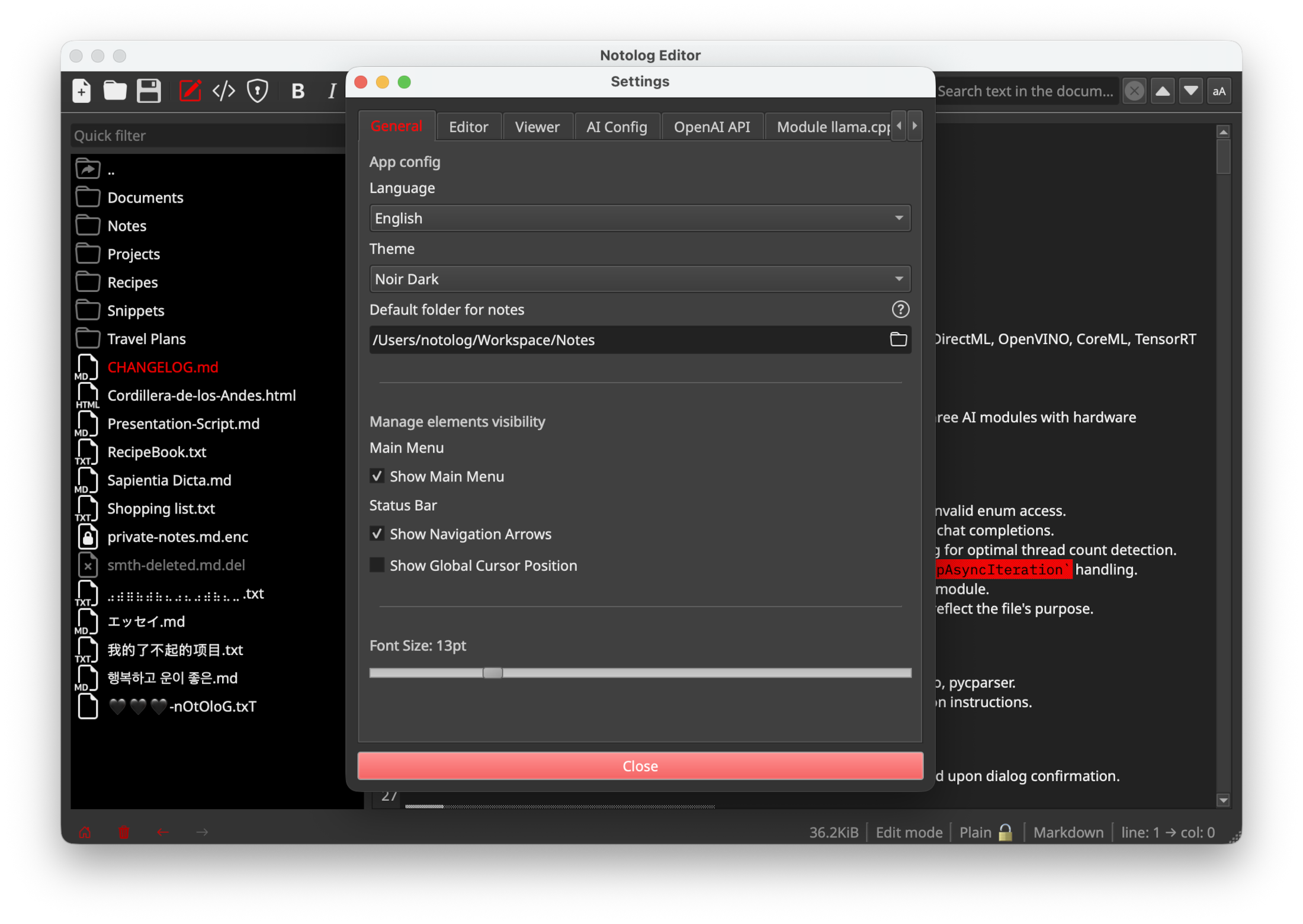
The General tab contains app-wide configuration options.
App Config
| Setting | Key | Default | Description |
| Language | app_language | en | UI language selection |
| Theme | app_theme | default | Visual theme (default, calligraphy, nocturne, noir_dark, spooky, strawberry) |
| Default folder for notes | default_path | (empty) | Primary directory for notes |
Elements Visibility
| Setting | Key | Default | Description |
| Show Main Menu | show_main_menu | true | Display the app's main dropdown menu |
Status Bar
| Setting | Key | Default | Description |
| Show Navigation Arrows | show_navigation_arrows | true | Show navigation arrows in the status bar |
| Show Global Cursor Position | show_global_cursor_position | true | Display cursor position in status bar |
Font Size
| Setting | Key | Default | Description |
| Font Size | app_font_size | 12 | Global font size (range: 5-42) |
Editor Tab
Editor-specific configuration options.
| Setting | Key | Default | Description |
| Show Line Numbers | show_line_numbers | true | Display line numbers in the editor |
Viewer Tab
Viewer-specific configuration options.
| Setting | Key | Default | Description |
| Convert Text Emojis to Graphics | viewer_process_emojis | true | Convert text emojis to graphical representations |
| Highlight TODOs | viewer_highlight_todos | true | Emphasize @todo tags within the text |
| Require Confirmation to Open Links | viewer_open_link_confirmation | true | Ask for confirmation before opening external links in browser |
| Auto-save external images to disk | viewer_save_resources | true | Automatically saves copies of external images to disk for offline access |
AI Config Tab
AI Assistant configuration options.
| Setting | Key | Default | Description |
| Active Inference Module | ai_config_inference_module | (none) | Select from available AI inference modules |
| Multi-turn dialogue with conversational memory | ai_config_multi_turn_dialogue | true | Enable multi-turn dialogue that retains the previous prompt for conversational memory |
| Convert the result to Markdown | ai_config_convert_to_md | false | Convert the output message into Markdown format |
AI Module Settings
Each AI module has its own settings tab in the Settings dialog.
On-Device LLM (ONNX)
| Setting | Key | Default | Description |
| ONNX Model Location | module_ondevice_llm_model_path | (empty) | Path to ONNX model directory |
| Temperature | module_ondevice_llm_response_temperature | 20 | Response randomness (0-100, maps to 0.0-1.0) |
| Maximum Response Tokens | module_ondevice_llm_response_max_tokens | 0 | Maximum response tokens (0 = unlimited) |
| Hardware Acceleration | module_ondevice_llm_execution_provider | cpu | Execution provider (CPU, CUDA, DirectML, etc.) |
| Prompt History Size | module_ondevice_llm_prompt_history_size | 0 | Number of previous turns to remember |
Module llama.cpp (GGUF)
| Setting | Key | Default | Description |
| Model Location | module_llama_cpp_model_path | (empty) | Path to .gguf model file |
| Context Window Size | module_llama_cpp_context_window | 2048 | Token context size (1-65536) |
| Chat Formats | module_llama_cpp_chat_format | auto | Chat format template (chatml, llama-2, etc.) |
| System Prompt | module_llama_cpp_system_prompt | (empty) | Initial instructions for the model |
| Response Temperature | module_llama_cpp_response_temperature | 20 | Response randomness (0-100) |
| Max Tokens per Response | module_llama_cpp_response_max_tokens | 0 | Maximum response tokens (0 = unlimited) |
| Size of the Prompt History | module_llama_cpp_prompt_history_size | 0 | Number of previous turns to remember |
OpenAI API
| Setting | Key | Default | Description |
| API URL | module_openai_api_url | https://api.openai.com/v1/chat/completions | API endpoint URL |
| API Key | module_openai_api_key | (empty) | API key (stored encrypted) |
| Supported Models | module_openai_api_model | gpt-5.2 | Model name to use |
| System Prompt | module_openai_api_base_system_prompt | (empty) | Initial instructions for the model |
| Temperature | module_openai_api_base_response_temperature | 20 | Response randomness (0-100) |
| Maximum Response Tokens | module_openai_api_base_response_max_tokens | 0 | Maximum response tokens (0 = unlimited) |
| Prompt History Size | module_openai_api_prompt_history_size | 0 | Number of previous turns to remember |
Command Line
Notolog supports the following command-line options:
notolog --version  # Show version information
notolog --help     # Show help message
For AI-specific configuration, see AI Assistant Guide.